Resources / Webinars / Replay
How I rebuilt my tech stack to have weekends back, cases under control, and a firm that runs itself: a live session with Nadine Heitz
Stop managing your software. Start practicing law.

River Sol
Marketing Assistant · June 11, 2026
Jun 11, 2026 · 47 min · Free replay
Nadine Heitz hasn't worked a weekend in years. She recently spent three weeks in Japan and never opened a case file. Her clients still got their answers. Her cases still moved. Nobody was waiting on her.
Nadine is a practicing Immigration Attorney in South Florida, and she built the system that makes it possible: Caseflow, a CRM and case management system running on monday.com.
She’ll walk through exactly how she got there, the audit that started it, the automations that run her firm now, and what it actually costs to do the same thing yourself. Here's what you need to know.
The week every law firm recognizes
Nadine started her solo firm in 2020. Five years in, she hit that wall like everyone else does. Her conclusion wasn't that she needed to work harder. It was that she needed software built around her firm, not a firm built around whatever the software happened to offer.
Stop adapting to your software. Let your software adapt to you.
Twenty years ago, technology was a nice bonus. Ten years ago, it was a competitive edge. Today, it's survival, which means it belongs in your budget the same way rent and payroll do, not as an afterthought.
Start with what you're already paying for
Before buying anything new, find out what you already own. Nadine's method is deliberately simple: a spreadsheet, or even a piece of paper. Four columns, the app's name, how many users are registered, what it costs annually, and what features it actually has.
That last column is the one most firms skip, and it's the one that matters most. You're probably using a fraction of what you're paying for. You might be paying for the same function twice without realizing it.
Some overlap is fine. The rule isn't zero duplication. It's knowing exactly where your money is being spent.
You don't have to run this alone
Most attorneys don't have the bandwidth to run a tech audit, test new workflows, and stay current on every vendor update on top of practicing law. So don't. Appoint a tech champion.
The paralegal who's always the first to learn a new feature. The assistant everyone already goes to when something breaks. Hand that person ownership: researching tools, sitting in on demos, testing workflows before they go live, training the rest of the team, bringing recommendations back to you.
Nadine ran her own tech audit for years before handing it to her lead paralegal. Their firm now runs an internal help desk board right inside monday.com, anyone with a tech problem submits a ticket, and it gets resolved without ever landing on her desk.
Put it on the calendar or it won't happen
Nadine books one to two hours a week for her tech stack, treated with the same seriousness as a client meeting. During that time, she talks to her tech champion, reviews what staff keep complaining about, and asks one question:
“What's the most annoying thing you do every day?”
Staff often build their own workarounds for broken software instead of telling you, copying and pasting between systems, re-keying information by hand, because they don't want to bother you. Make it clear that flagging a broken workflow isn't a complaint. It's the job. Vendors want to hear it. So should you.
Fix the phone tag before it starts
Most firms still run on voicemail, sticky notes, and a stack of messages waiting on someone's desk Monday morning.
Nadine's firm runs differently: every call ends in a calendared callback, never a message.
A live receptionist, backed up by an AI answering tool, picks up every call around the clock. The caller books a callback directly on a specific team member's calendar, nothing gets "taken down" to be dealt with later.
The payoff is that staff walk into every callback already knowing who's calling and why, instead of returning a stack of vague messages cold.
Let the repetitive stuff answer itself
If you're explaining the same thing to clients over and over, why a case is taking this long, what documents are still needed, that answer belongs in a template, not a fresh reply every time.
Nadine's system takes it a step further with trigger-based automation. When a biometrics notice arrives, a staff member enters the appointment date, clicks a button, and the client automatically gets an email confirming the date with a link to book a follow-up call if they have questions.
Watch for the change, not the screen
Most immigration software lets you enter a receipt number and see status updates. Nadine's system goes further, it tells her and her team the moment something actually changes, instead of asking anyone to remember to go check.
Every status update lands in a dedicated folder in her inbox. An RFE notice fires ten pre-built tasks in a single click, get the notice, tell the client, confirm billing, prepare the response, each one already assigned to a name and a date.
How AI actually earns its place
Call summaries land automatically in the case record through tools like Aircall, so nobody's taking notes after a call anymore. Case-status summaries pull from the full history, notes, emails, everything.
So when a client asks why their case hasn't been filed, the answer is a click away instead of a scramble through the file. Meeting and consultation summaries flow the same way, straight into the relevant case.
Make your systems actually talk to each other
A tech audit usually turns up ten or more apps in daily use. The goal isn't fewer apps. It's making sure the ones you keep are actually connected.
Here's what that looks like end to end in Nadine's firm.
- /01
A lead calls in.
- /02
The reception service books the consultation through Calendly.
- /03
That Calendly-to-monday.com integration adds the new lead to the CRM.
- /04
After the consultation, a contract goes out through an e-signature integration.
- /05
Once it's signed and paid, monday.com creates the case file itself and loads the starting task list.
That's the actual test of a connected tech stack, not how many tools you own, but how little manual re-entry happens between them.
Build a dashboard that actually tells you something
A good dashboard answers one question fast: what's happening right now? Nadine checks hers daily, new leads this week versus last, incoming calls with AI summaries attached, consults booked, deadlines closing in.
There's no universal right answer here. A five-person solo practice and a fifty-person firm need to see completely different things, which is exactly why dashboards get built custom to the practice instead of shipped as a default.
What Caseflow actually is
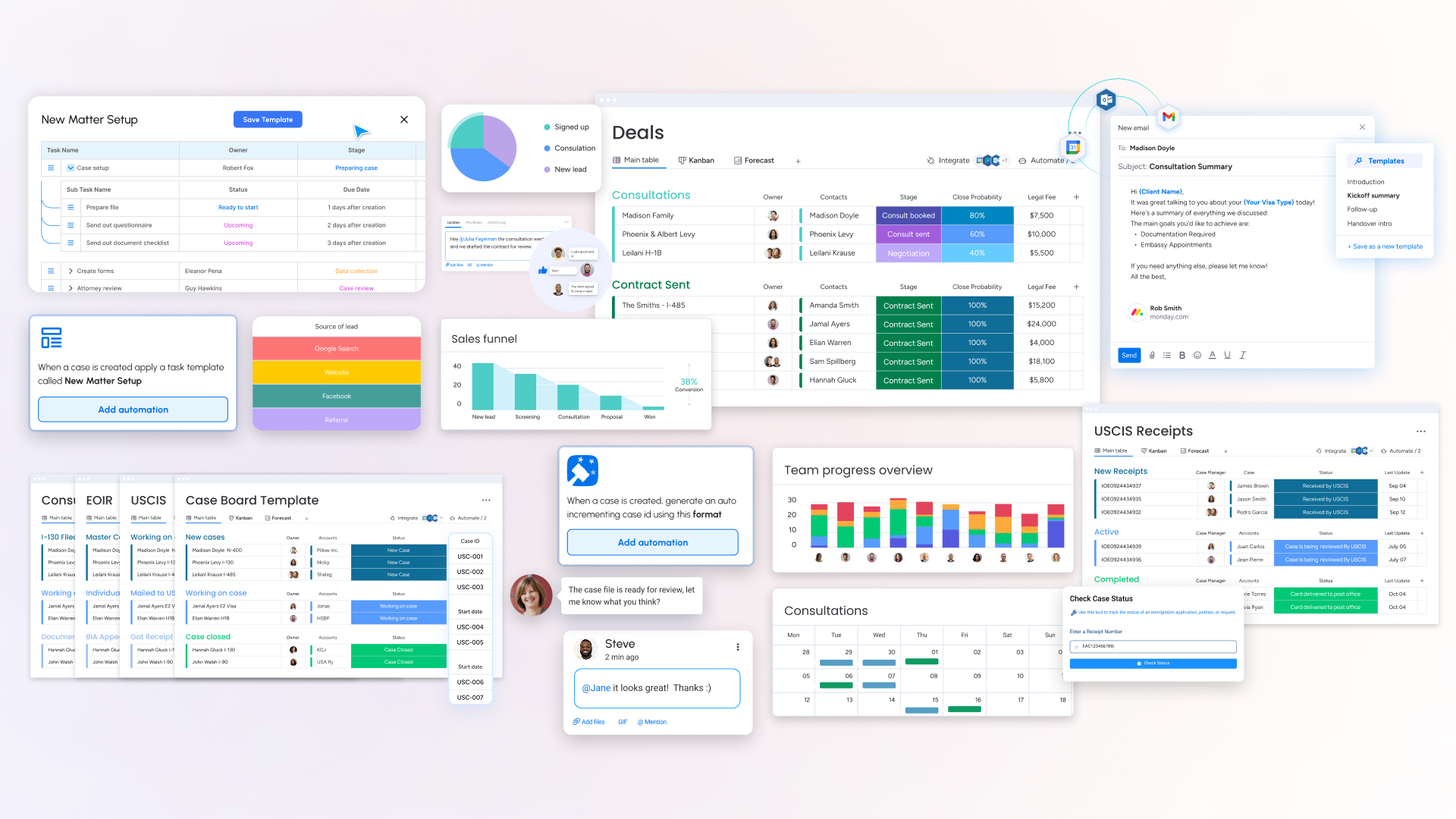
Caseflow is the CRM and case management system Nadine built on monday.com, now offered to other immigration firms through Workiflow. It runs on boards, think spreadsheets with automation and stage-tracking built in, not static rows.
The CRM board holds every contact who's ever touched the firm, moving from new lead to active client to past client, with lead source tracked so marketing decisions are based on where clients actually come from, not guesswork.
The deals board tracks consultations through booking, payment, and contract, mostly moved automatically by the Calendly integration.
Separate case management boards exist for USCIS filings, EOIR removal cases, and consular processing, because each one moves through genuinely different stages and deserves its own structure instead of one generic pipeline forced onto all three.
Email tracking comes built in, every message sent to or from a client, by anyone on the team, logs automatically, whether you're on Gmail or Outlook.
It doesn't replace your forms software. It replaces the Excel spreadsheets most firms build because their case management software won't track cases the way they actually need it to.
Things to do this week
Run a tech audit.
Find out what you're actually paying for before adding anything new.
Automate one process.
Pick the thing your team repeats most and template or trigger it.
Learn one AI feature.
A call summary tool. A case-summary assistant. You don't need to overhaul everything at once, you just need to start.
Frequently asked questions about law firm automation
Caseflow is a CRM and case management system built on monday.com, purpose-built for immigration law firms, covering lead intake, case tracking, task automation, and status monitoring.
No. Caseflow handles CRM and case management. It's built to work alongside forms software, and integrations with forms platforms continue to expand.
$65 per user per month, with a five-user minimum to start.
No. Starting with one feature, an AI call summary or a case-status assistant, is enough to see the difference. You don't need to code, and you don't need to become an expert.
Used carefully, yes. Never accept AI output without verifying it. Some courts and state bars now require attorneys to disclose AI use and independently confirm citations before filing.
Run a tech audit. Before you add a single new tool, find out exactly what you're already paying for and how much of it your team is actually using.
The real return
It’s about getting back the ability to take an actual vacation, leave the office at a normal hour, and trust that a case is still moving even when you're not the one watching it.
That's the return that matters. Not a fancier dashboard, a firm that runs whether or not you're in the building that day.
/ Start
Workiflow is Nadine's partner company for Caseflow, and a monday.com Platinum Partner that's helped immigration firms of every size, from five-person solo practices to fifty-person teams build case management systems that fit how they already work. To see how Caseflow can be configured for your firm's case mix and existing tools, book a one-on-one demo.
Workiflow is a monday.com Platinum Partner and CRM Specialist that has served nearly 1,000 clients across SMB to Fortune 500. To learn how vibe coding can be applied to your operations, contact the Workiflow team.
30 minutes. No commitment.