How Do I Deploy Claude in My Company’s Workflows?
The short answer: Think of deploying Claude across a company in three layers. First, seats. Claude Team covers 2 to 150 people at $20 per standard seat per month billed annually, and Claude Enterprise is $20 per seat plus usage at API rates, with single sign-on, SCIM, audit logs, and spend controls. Second, connectors, so Claude works inside the tools you already use, including a monday.com connector listed in Anthropic’s connector directory. Third, automation, through Agent Skills, Cowork, and the Claude API. Start with seats and one connector, and grow from there.
Helps business teams design, deploy, and govern monday.com systems and the AI that runs on top of them — from native AI agents and Sidekick to Claude agents connected through MCP.
If your team already has a way of working that runs well, the question is not whether Claude can help. It is where Claude fits without disturbing the parts that already work. That is a much friendlier question to answer, and it is the one this guide is built around. Everything below is drawn from Anthropic’s and monday.com’s own documentation, verified in August 2026.
What does deploying Claude actually mean in practice?
There is no single Claude product you install. There are a few different surfaces, and these are the ones that matter for a company rollout.
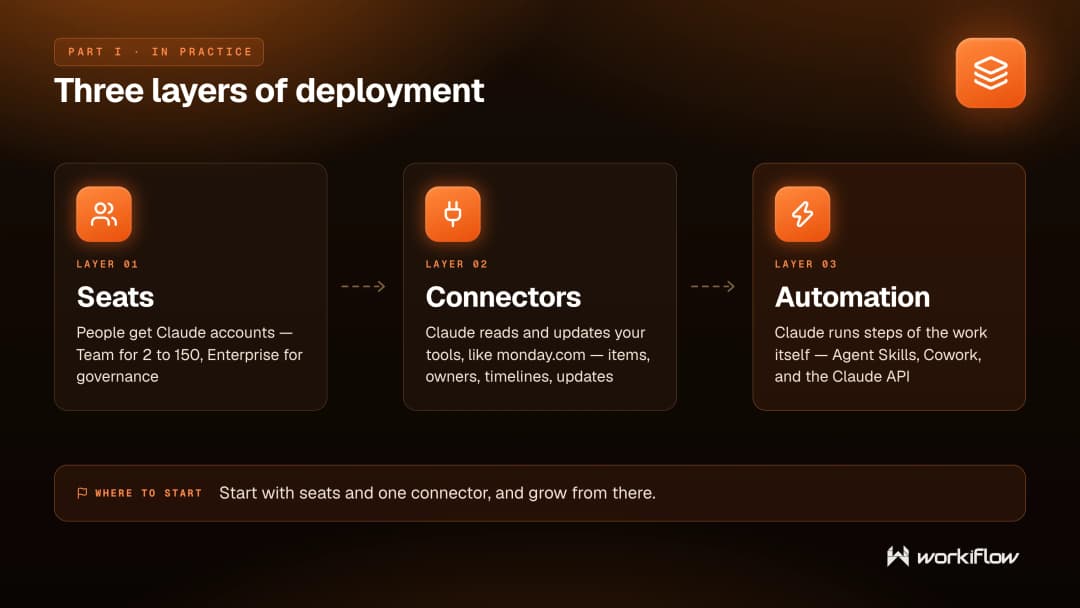
The first is the chat interface on a business plan, which is where most people spend their time. Around it sit connectors, which Anthropic describes as letting Claude access your apps and services, retrieve your data, and take actions within connected services. Then there is Cowork, available on all paid plans, which are Pro, Max, Team, and Enterprise, running in the Claude desktop app for macOS and Windows. Cowork on web and on mobile are in beta, and on Enterprise plans they appear where an admin has enabled them. Finally, for engineering teams and for anything you embed in your own software or run unattended, there is Claude Code and the Claude API, including Claude Managed Agents, which are in beta.
You do not need all of these on day one. Most companies start with seats and one connector, and reach for the rest as specific needs show up.
What does Claude cost for a company?
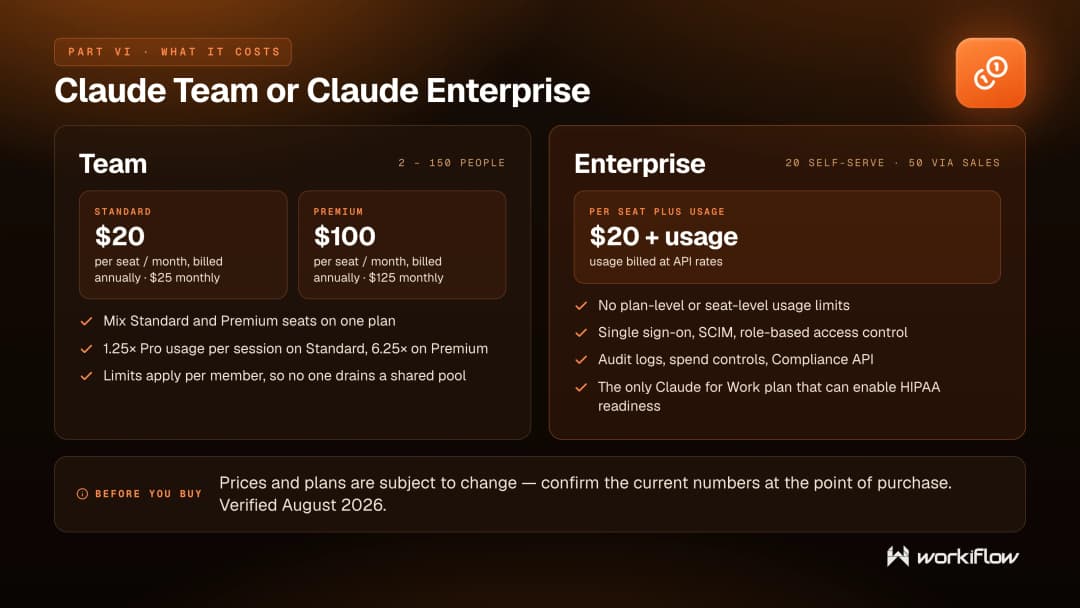
Claude Team covers 2 to 150 people. A Standard seat is $20 per seat per month billed annually, or $25 monthly, and a Premium seat is $100 annually, or $125 monthly. You can mix seat types on one plan, which is useful when a few people do the heavy lifting.
A Standard seat gives 1.25 times more usage per session than Pro, a Premium seat gives 6.25 times more, and Anthropic applies limits per member rather than pooling them, so one heavy user cannot use up everyone else’s capacity.
Claude Enterprise is $20 per seat plus usage billed at API rates, with a minimum of 20 seats self-serve and 50 seats through a sales conversation. Usage-based Enterprise plans have no plan-level or seat-level usage limits. Anthropic’s pricing page notes that prices and plans are subject to change, so it is worth confirming the current numbers when you buy.
How does Claude connect to monday.com ?
monday.com publishes a monday.com connector for Claude, listed in Anthropic’s connector directory. Anthropic’s listing shows monday.com as the publisher, with support across Claude, the Claude desktop app, the Claude mobile app, Claude Code, and the Claude API. The listed capabilities include searching boards, creating and updating items and columns, assigning owners, setting timelines, and posting updates, so Claude can genuinely work inside your boards rather than just read them.
In its own announcement, monday.com says the connector is built on monday MCP, uses OAuth authentication, and respects your existing monday.com permissions. Claude only has access to the data you already have permission to see, and nothing beyond that. You need a Claude Pro, Max, Team, or Enterprise plan to use it.
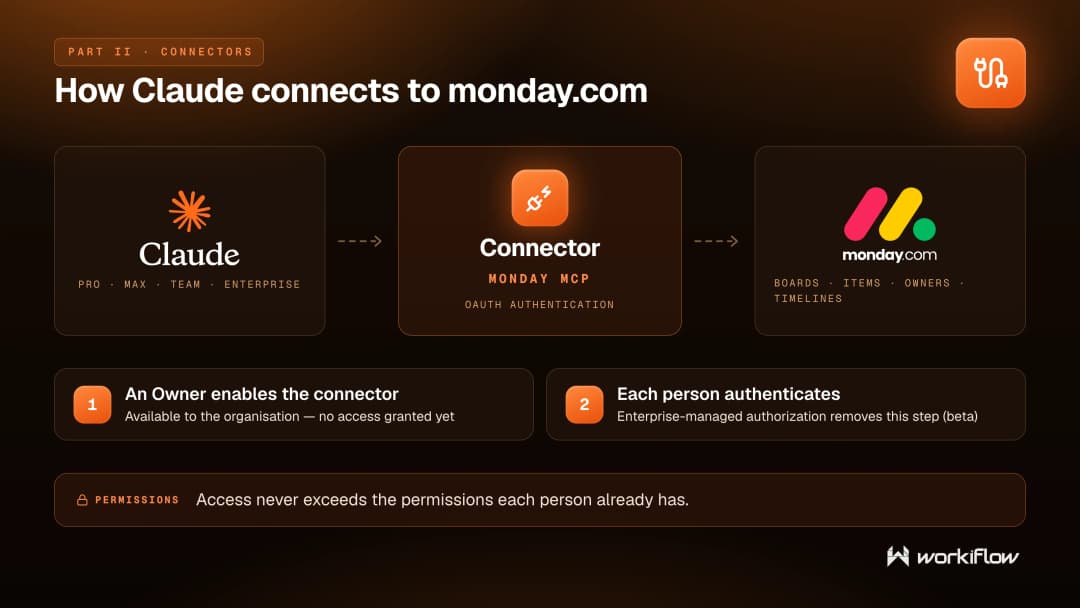
It helps to be clear about what this is. This is a connector, not a merger of the two products. monday-MCP is monday.com’s implementation of the Model Context Protocol, an open standard that monday.com says is designed to work with any AI tool that supports the protocol. monday.com adds that compatibility depends on the assistant’s implementation, and advises checking with your AI provider to confirm support.
Who has to approve what before anyone can use it?
On Team and Enterprise plans, connectors follow a two-step model. An Owner or Primary Owner enables a connector in organization settings, which makes it available without granting anyone access, and each person still authenticates individually. Anthropic also has an Enterprise-managed authorization option that removes the second step, currently in beta.
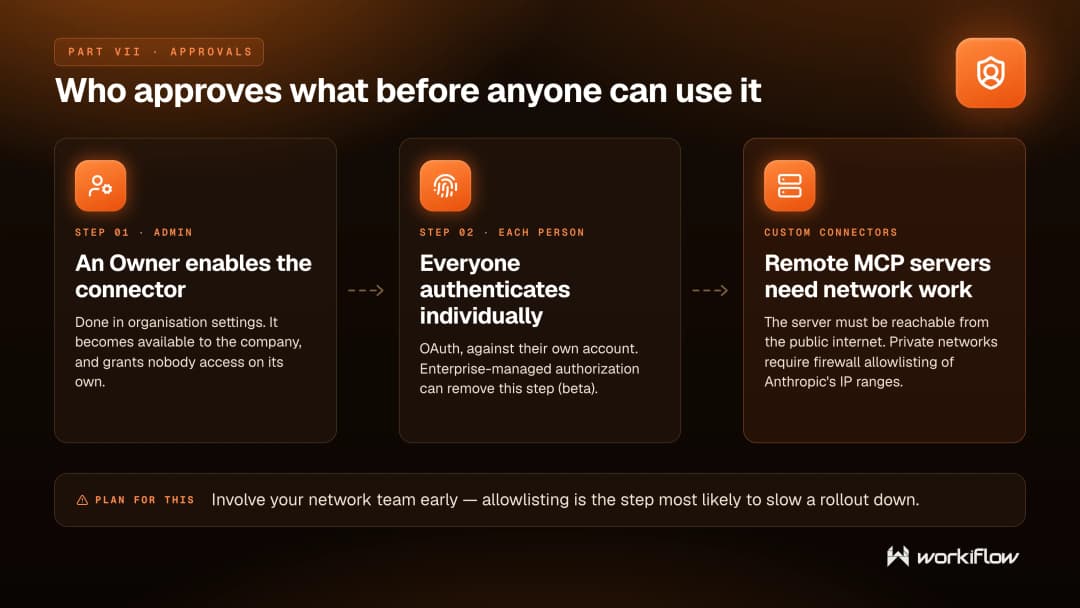
You can add custom connectors too, using remote MCP servers, supported on the Free, Pro, Max, Team, and Enterprise plans, with free users limited to one. The server has to be reachable from the public internet, and private networks require firewall allowlisting of Anthropic’s IP ranges. If your systems sit behind a firewall, it is worth involving your network team early, since that is the step most likely to slow a rollout down.
What happens to your company’s data ?
This is usually the question that decides whether a rollout gets approved, so here is what Anthropic’s own documentation says, point by point.
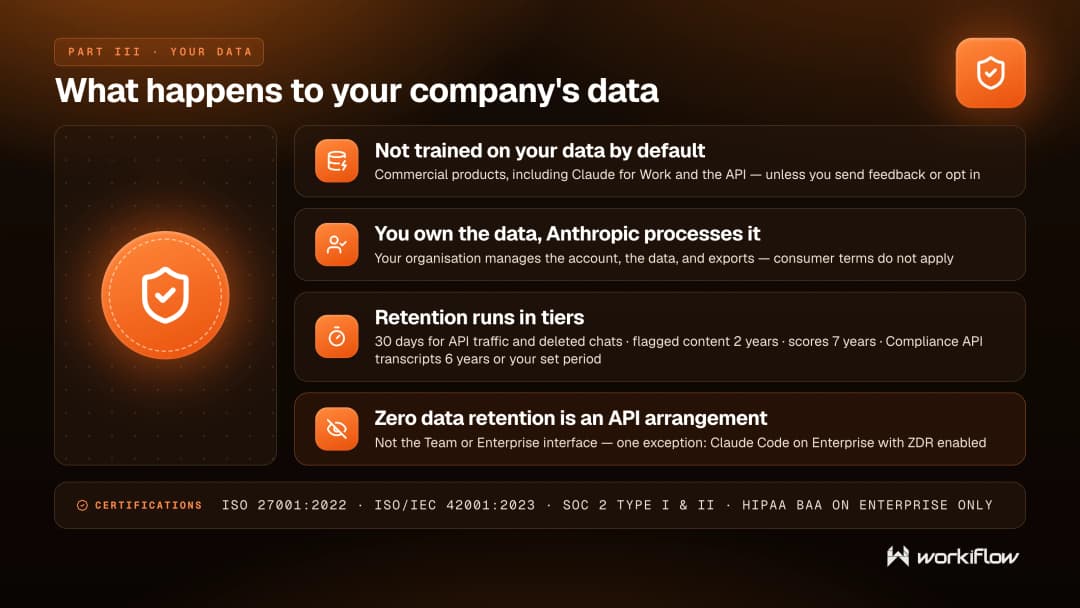
On training, by default Anthropic does not use inputs or outputs from its commercial products, which include Claude for Work and the Claude API, to train its models. The exception is if you explicitly report feedback or bugs, or otherwise choose to allow it.
On control, Claude for Work plans Anthropic acts as the data processor, your organization manages the account and the data including exports, and Anthropic’s consumer terms and privacy policy do not apply.
On retention, Anthropic deletes Claude API inputs and outputs from its backend within 30 days, and deleted chats leave backend storage within the same window. Flagged content is kept for up to 2 years, and classification scores for up to 7 years. For Claude Enterprise organizations using the Compliance API, which covers session transcripts in beta, transcripts of Cowork and Claude Code sessions that run on users’ own machines are retained for 6 years by default, or for your organization’s custom conversation retention period where you have set a finite one, whether that is shorter or longer than the default. Cowork sessions that run in the cloud are retained for 6 years.
On zero data retention, this is a Claude API arrangement, enabled per organization through your account team, under which Anthropic does not store prompts or responses at rest after the API response is returned. The Claude Team and Claude Enterprise interfaces are not eligible, with one documented exception, which is Claude Code used through Claude Enterprise with zero data retention enabled.
On certifications, according to Anthropic’s Privacy Center, Anthropic holds ISO 27001:2022, ISO/IEC 42001:2023, and SOC 2 Type I and Type II, and offers a HIPAA-ready configuration with a Business Associate Agreement available. Anthropic’s help center article on HIPAA-ready Enterprise plans adds detail worth knowing.
Among the Claude for Work plans, HIPAA readiness can be enabled only on Enterprise, and Team, Free, Pro, and Max cannot enable it. Claude Code is covered by your Business Associate Agreement only where zero data retention is enabled on a qualified account, and Anthropic says Cowork is not yet covered.
What can your administrators actually control?
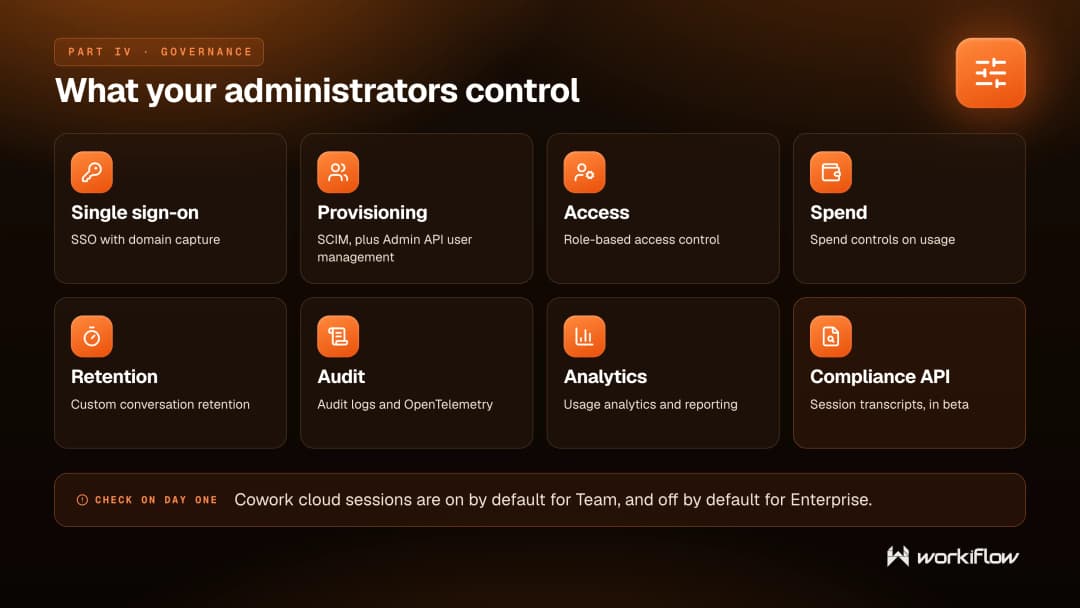
Claude Enterprise adds the controls a security team expects to see: single sign-on and domain capture, SCIM provisioning, role-based access control, spend controls, data retention controls, audit logs and OpenTelemetry monitoring, usage analytics and reporting, and a Compliance API. The pricing page also lists network access control, IP allowlisting, and Claude Security, which is marked beta.
The pace of change matters too, and it is moving in the admin’s favor. In August 2026 Anthropic made Admin API user management for Claude Enterprise generally available, extended the Compliance API in beta to Cowork and Claude Code session transcripts, and launched inference hooks in beta.
One default is worth checking on day one: Cowork cloud sessions are on by default for Team and off by default for Enterprise.
How should you sequence the rollout?
The most reliable pattern is to start small. Pick one workflow with a clear owner and a visible result rather than rolling Claude out to everyone at once. Buy the smallest plan that meets your governance requirements, and if you run on monday.com, have an admin install the monday MCP app and scope it to one workspace first. Then package the repeatable parts.
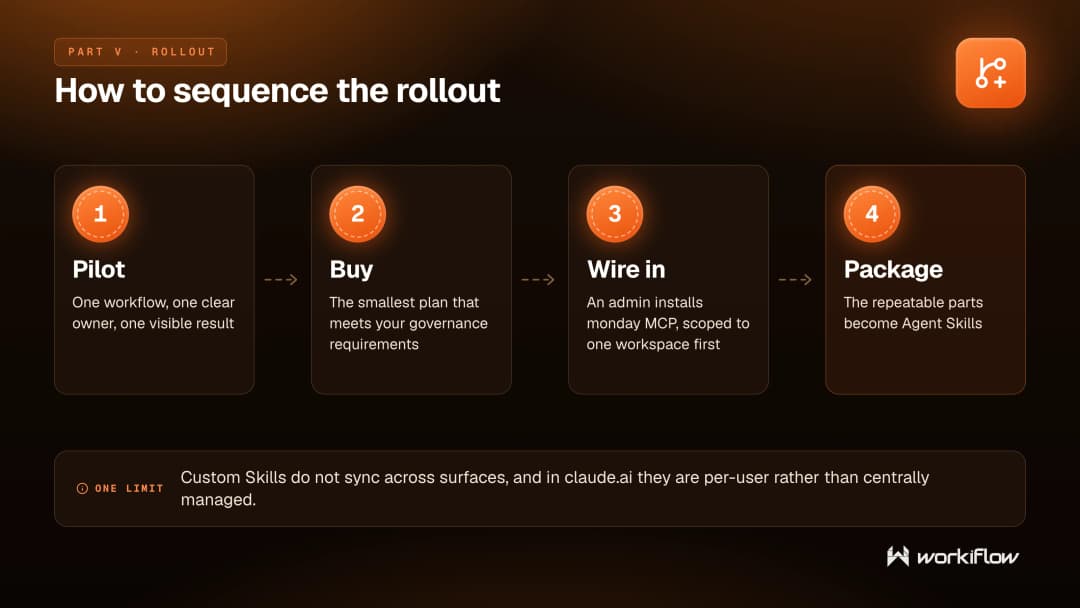
That last step is where Agent Skills come in. A Skill packages instructions, metadata, and optional resources such as scripts and templates that Claude uses automatically when relevant, and custom Skills work in Claude Code, in the Claude API, and in claude.ai on the Pro, Max, Team, and Enterprise plans with code execution enabled.
Two honest limits are worth knowing before you lean on them. Custom Skills do not sync across surfaces, so one uploaded to claude.ai is not available in the API or in Claude Code. And in claude.ai, Anthropic states custom Skills are individual to each user and cannot be centrally managed by admins. Anthropic also advises using Skills only from trusted sources.
When do you not need help with this?
Genuinely, if you have fewer than a dozen people, one clear workflow in mind, and someone internally who enjoys this kind of thing, buy Team seats, switch on one connector, and get going. You do not need a partner for that, and we would rather say so.
Outside help starts to earn its cost somewhere else. You need single sign-on, audit logs, and a retention policy that survives a security review. You are connecting Claude to systems holding customer or financial data. You want the same way of working reproduced across departments. Or you have monday.com carrying a real operational process and you want Claude acting inside it safely rather than beside it.
Workiflow builds and runs exactly that kind of deployment, and we are a member of Anthropic’s Claude Partner Network.
Frequently asked questions
Claude Team covers 2 to 150 people and is the simpler purchase. Claude Enterprise is the answer when you need single sign-on, SCIM provisioning, role-based access control, spend controls, audit logs, or the Compliance API.
Not by default. Anthropic states it does not use inputs or outputs from its commercial products, including Claude for Work and the Claude API, for training. The exception is feedback or bug reports you submit, or otherwise agreeing to it.
Yes. monday.com publishes a monday.com connector for Claude, listed in Anthropic’s connector directory, built on monday MCP, using OAuth and respecting your existing monday.com permissions. An admin installs the monday MCP app from the monday marketplace first, and access can be limited to specific workspaces.
monday.com states there is currently no additional cost to use monday MCP and that it is available on all monday.com plans. You may still pay for the AI tool you run MCP actions through.
Claude Code documents routines, in research preview, that run in the cloud and keep going when your computer is off. Anthropic notes that routines belong to an individual claude.ai account rather than being shared with teammates, and that they run with no approval prompts during a run. Claude Managed Agents is Anthropic’s managed harness for long-running work, in beta, and it is not eligible for zero data retention or a HIPAA Business Associate Agreement.
Anthropic’s documentation says Claude Tag, its Slack integration, is in public beta on the Team and Enterprise plans, and not available on Free, Pro, or Max, or for third-party deployments. It adds no per-seat charge, because channel and thread work is billed by usage against a balance an Owner funds. Anthropic’s Claude Tag product page lists Microsoft Teams as coming soon.